Frequency configuration two-way radio: how to understand what you need, and what will happen if you make a mistake

One model - several different devices
The vehicle-mounted or handheld station of the popular series is available in several frequency configurations. Outside they are almost the same, the model number is the same, and work in different ranges.
The difference is not in the setting, but in the hardware: the power amplifier, output filters and input chains are designed for their own band. Configuration is not a parameter that is changed by the program.
From this follows the main practical rule: when ordering, indicate not the model, but the model along with the range. Ordering "same as ours" without a lane indication regularly results in incompatible delivery.
The second consequence is that stations of different configurations in the same park are not interchangeable, even if they are indistinguishable. They are marked immediately upon receipt.
How to determine your configuration
The first source is permission documents for the network. There is a lane in which you are allowed to work, and it is under it that the equipment is selected.
The second one is the nameplate on the hull. It usually has a range designation on it, and this is the fastest way to check an existing station.
The third is the setup program. It shows the permissible boundaries for a particular instance, and will not allow you to go beyond them.
The fourth is the antenna. It is also designed for bandwidth, and if the antenna is from a different range, communication will be poor even with the right station.
If there are no documents, and the nameplate is unclear - measure. A matching device and any signal source will respond in ten minutes.
What happens when you make a mistake
The station of another configuration usually turns on and looks good. It can even receive a strong neighbor signal. That's what's misleading.
In the transmission, the output cascade works on an uncoordinated load. Part of the power is reflected, the transmitter warms up and goes into defense, and with prolonged operation fails.
At the reception, the input filters cut the desired strip. The range drops significantly, and this is attributed to a “bad point” or “weak antenna”.
A separate case is work outside the permitted lane. This is no longer a technical problem, but a legal problem, and it is revealed by the complaint of the person you interfered with.
The antenna must match the configuration.
The antenna is calculated on the strip in the same way as the station. A pin from the neighboring range will physically fit along the connector and will look working.
This is checked by the measurement of approval, not by appearance. On your lane, the indicator is normal, on someone else's - you can immediately see.
Many pin antennas allow trimming to a specific frequency. Cut the measurement, shooting a little: you can shorten, you can not return.
When changing the configuration, the antennas are also changed. The savings on this step devalue the entire replacement.
What to ask before ordering
What band is specified in the permits for the network.
What is the configuration of the stations that are already working, and whether it matches the documents?
Whether the station needs to be in the same park or whether it's a separate new network.
What accessories are already there and whether they are fit for a new delivery: antennas are range-bound, while tangents and headsets are usually not.
How many stations are planned in total: the expansion of the park is more convenient to lay in the resolution immediately, and not a separate call in six months.
How to clean up an existing park
Make a list: inventory number, model, configuration, serial number, to which antenna is connected. This is done once and saves years.
Label the stations by configuration so that it is visible without inclusion: a color tag on the case.
Reduce settings to one reference file for each configuration, rather than storing disparate sets.
Plan a warehouse: stations of different ranges are not stored in one box, otherwise the wrong one leaves for the object.
And check the antennas: in the old park, they are often confused between machines after repairs.
Consistent configuration and GM340 kit
Compare the full marking of the station with the existing park and indicate it in the application. Individual VHF and UHF cards help to order the desired configuration; the composition of the power supply connection is coordinated according to the exact model. Send a list of jobs and a photo of the nameplate - prepare a quotation with the station and selected accessories.
Motorola GM340 VHF
The real body GM340. The range and full configuration of the instance is confirmed by marking and quotation.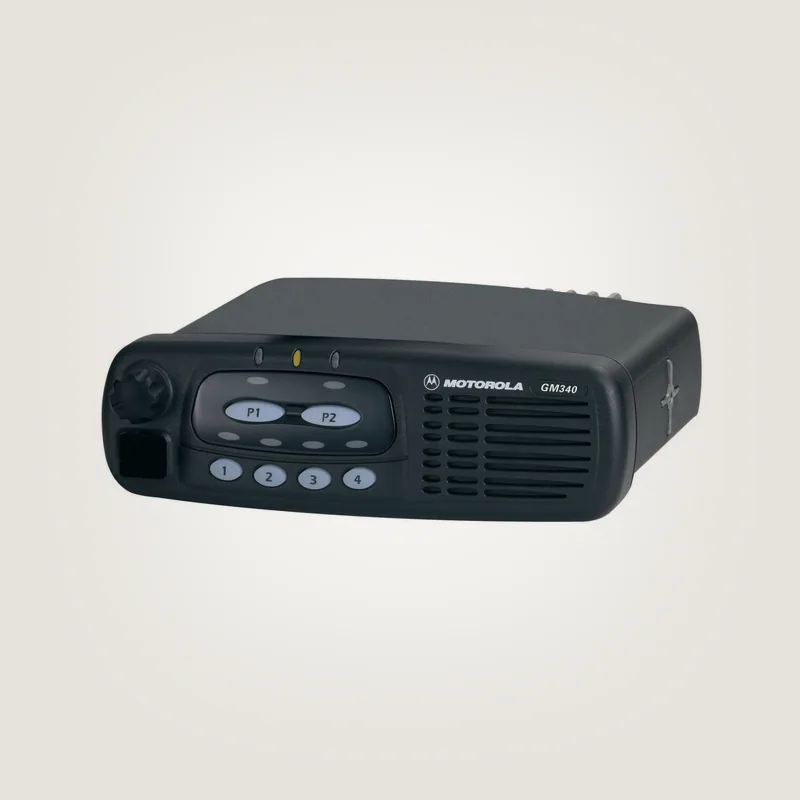
Motorola GM340 UHF
GM340, different angle. The appearance of the range is not defined; the configuration is agreed separately.
HKN4137 power cable
Cable from a valid card HKN4137. The full code, length and scope of supply are agreed upon for the selected station.Request quotation: office@gm340.ru · +7 381 249-00-02Please email us. Provide the full models, quantity and address of receipt; composition, current availability and deadline will be agreed in the response.


